Showing posts with label arts. Show all posts

Friday, May 11, 2012

Using Audacity to Learn About Jazz


Subject: Music
Grade: 5
Technology tools: Computer
Tools used: Audio Creator/editor
Activity type: Lesson

Mrs. Moore, a 5th grade teacher, gave me a list of reading strategies from Open Court that were set to silly children’s melodies.

We were learning about jazz and blues in 5th grade music, so I taught the students what a 12-bar-blues pattern is, we sang a 12-bar blues song, and then they played the patterns on the barred instruments. I then assigned the Open Court songs to two or more students in a group. Our objective was to discover what an “arranger” does to music. The group had to re-write the song so they could perform it to a 12-bar-blues riff.
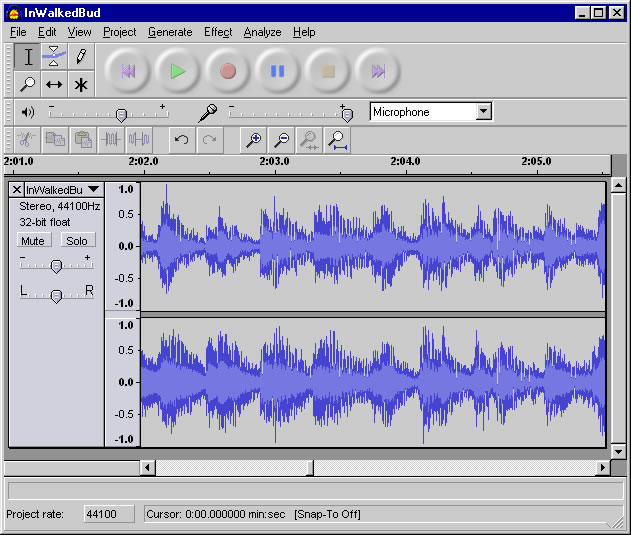

I have these recorded through the free software called Audacity and we are going to decide which recording is the best for each reading strategy and use them in a 12-bar-blues piece to remember the reading strategies for the EOGs.  I have recorded the students and put them in a folder on the shared drive at Viewmont. I am so pleased with what they have created!

I saved them as .wav files but I want to figure out how to put them on my webpage and then make a CD of them for future use. I had the students sit at my computer and use the Audacity software as they were recording. I know this is a free download, so some of them may be able to make use of it at home.

Wanda Logan,  Viewmont Elementary

Monday, May 7, 2012

Integrating Technology in Music


Subject:  Music (Arts)
Grades:  6, 7
Technology tools:  Computer(s), Laptop(s), Tuners, Phones
Tools used:  Interactive website, Video creator / editor, Audio creator / editor
Activity type:  Unit, Assessment

Learning Targets:
I can tune my instrument accurately
I can perform_________ in tune and with a steady beat.

We use digital tuners and smart phone apps to check our accuracy when we tune.

We also are using the interactive SmartMusic program for a SmartMusic review challenge with 6th and 7th graders.

Students use their phones and my iPhone to record tests and to send home recordings to practice with.
Tuners were purchased with a grant from DKG Sorority.

Students assess their progress on a daily basis with tuners and SmartMusic.  Test scores are about 20% higher for students who use their own phones to record tests and retests are higher for those who send their tests home to review using my iPhone.

We will continue to use all these strategies.

Integrating Technology Tools into Art Instruction

 
Subject:  Arts
Grades:  4, 5
Technology tools:  Computer(s), Digital camera
Tools used:  electronic presentation
Activity type:  Lesson, Unit, Project, Research, individual/collaborative work

My objectives are to encourage the use of technology in my classroom, to have the students learn more about using digital cameras/computers, to demonstrate that electronic presentations can be an art form, and creating electronic presentations can be a real life art career.

My students are working as teams to create electronic presentations on one (of their choice) of the Elements of Art.  They can choose from color, shape, line, texture, value, space, or form. 
They are using the computer and digital camera to explain/teach/illustrate their product with visuals.
This lesson, still in the works, has caused a lot of excitement with the students! 
I have found that we help each other.  I share my skills and they enjoy helping me and the other students by sharing their skills.

I'll be as proud of them as the students because this is a learning process for me too!
I use this as a real life situation.  We have a company that needs an informational product and the students are the producers of the product.  The class response will be the judge if their product would fit the needs of the company.

Since this is a visual product we will have the actual finished work for the assessment.
They are required to have at least ten pages and more is encouraged.  At this point it may be necessary to limit them since they are so excited!  Intro page, definition, examples of the Element, actual examples they found at school and from research on the computer will be included, and the compilation of team's efforts are some of the things I expect them to have in their presentation.

This activity has been highly successful so far.  I have students coming in during the day to tell/show me things they have found in the school to demo their element.  For example - I like seeing them get excited about the texture of the wall!  It may be the first time they really looked at them closely.  It is like a new discovery for them.

These productions will be used with my students next year to introduce the students to the various Elements of Art as we use them and as an example of what they can do also.

I would like to have an LCD projector to use so the creators could see what it looks like on a big screen, see what they might need to adjust for a more eye catching product and also to show the final products to the rest of the students.

Donna Buchanan, Art, Jenkins Elementary

Monday, April 23, 2012

ABC Mouse - an Interactive Community in First Grade


Subjects:  Math, Language Arts, Science, Social Studies, Arts
Grade:  1
Technology tools:  Computer(s), LCD Projector, Interactive Whiteboard
Tools used:  Interactive website
Activity type:  Lesson, Unit, Project, Assessment, Research

ABC Mouse is a website that my students and I use daily. This website is aimed at students Prek- 2nd grade, however it can be used for those students that may need extra help. This website is very easy to navigate and they also have how to videos to set up your account. The great thing about this website is it's free for teachers. Teachers will need to set up a classroom account. Teaches will create virtual students. The students will then have their very own "community".


Each community has a school, farm, zoo, phonics house, library, mall, and their very own tree house. Students can play games and complete lessons to earn tickets. The student then may buy things with their tickets. ABC Mouse covers wide variety of subjects and skills. This website allows teachers to differentiate for each individual child. I highly recommend this website and my students love it!

ABC mouse is always updating and adding new content for students to use.
Helpful hint: Teachers will need to click the blue tab that says schools/teachers (or click here) in order to create their free accounts.

http://www.youtube.com/watch?v=znmYk-Z3GmE  (video that explains ABCmouse.com)

This website allows teachers to see the growth and progress of each student.

Bonnie Jarrell,  Longview

Thursday, April 19, 2012

Exploring Music


Subject:  Music (Arts)
Grades:  K, 1, 2, 3, 4, 5
Technology tools:  Computer(s), LCD Projector
Tools used:  Video, Video creator / editor, Digital manipulative, Audio, Word processing
Activity type:  Lesson

Objectives:
*Understand the relationships between music and concepts from other areas.
*Exemplify music representing the heritage, customs, and traditions of various cultures

Lesson utilizing Carnival of the Animals - involving student understanding of how a composer chooses instruments and other musical characteristics to depict specific animals. We also examine the film industry and the use of sound effects to convey mood. Lesson is presented in PowerPoint format and offers students opportunity for individual critical thinking as well as collaborative group work. Video and sound clips are imbedded throughout as well as still pictures.

Denise Prince, Music, Jenkins Elementary